
SEO content briefs, built from the pages that rank
Short version: before Dinkum writes or rewrites a page, it reads the five pages Google ranks highest for that search and lists what three or more of them share: the names, phrases and sections they cover, and how long they run. It checks which of those your page already has, writes the page to cover the ones that are true and useful, and sends it as a pull request you approve. A day after it merges, Dinkum reads the live page again, so you see how much it covered before and how much it covers now. Each brief also shows what AI answers say about the same search and ends with one question for you, and once the page is live Dinkum keeps reading the top results every week, so the page doesn't fall behind when they move on.
A content brief is the list of what a page on a search needs to cover. The best ones aren't guesses: they come from the pages Google already ranks, because those show what people searching expect to find. Tools like Surfer, Clearscope and NeuronWriter build that list and turn it into a score for a writer to chase. Dinkum uses it differently. It builds the brief, then writes the page itself.
What a brief looks like
This is a real brief in Dinkum's dashboard. The business is our made-up demo dental practice, so the numbers are examples, but the screen is exactly what you get. The search is "dental implants brisbane". Twelve things came up on three or more of the top five pages. The page had three of them before the change and eleven after it.
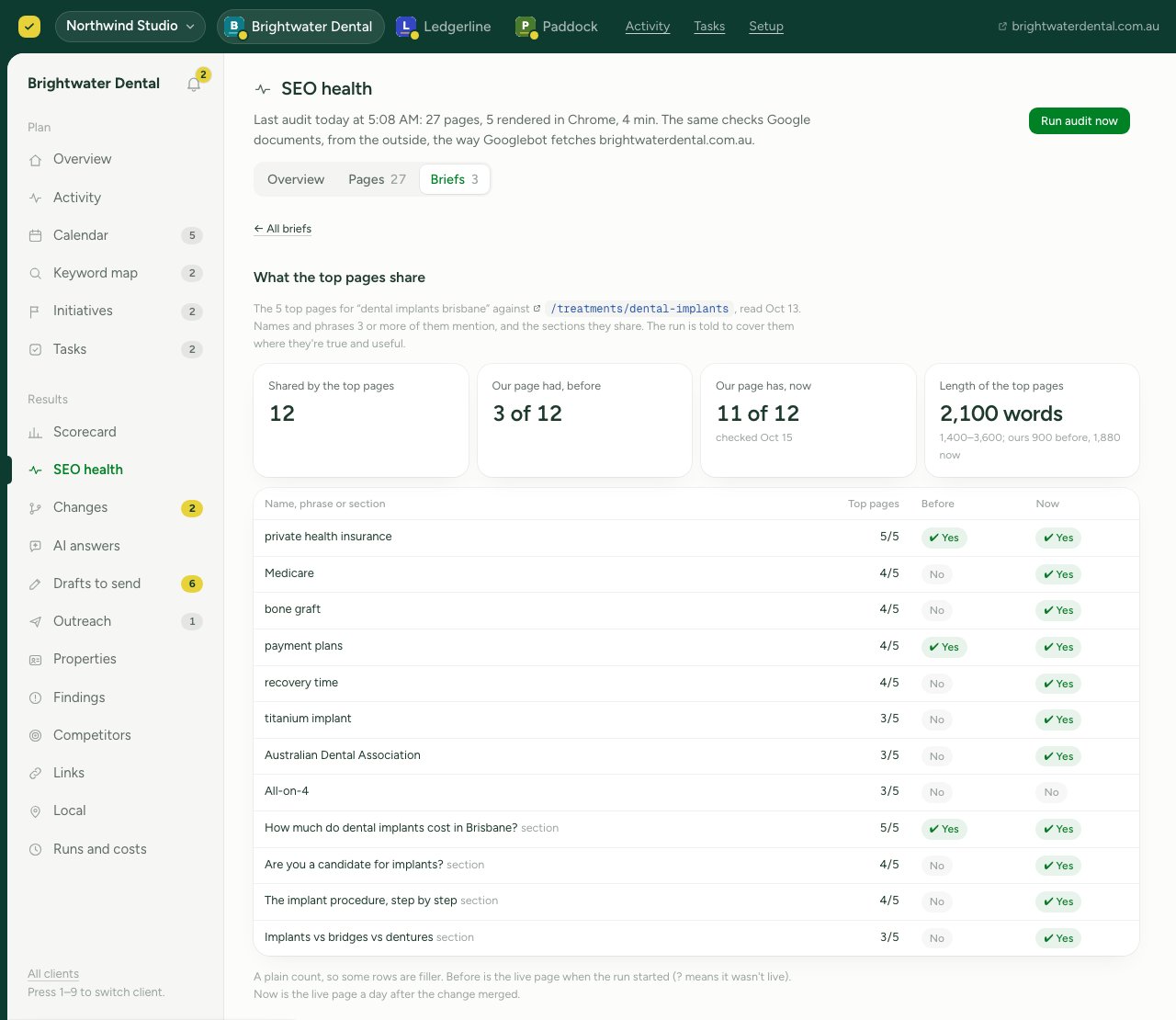
One row stayed at no: All-on-4, a full-arch implant treatment the practice doesn't offer. Three of the top pages mention it, but saying the practice does it would be false, so the page leaves it out and the run record says why. That's the rule: cover what's true and useful to the reader, and skip the rest out loud.
How it works
- Read the top five pages. Dinkum fetches the five pages Google shows first for the page's search, in your market, and reads their headings, length and text. A page behind a login or a bot check is left out rather than guessed at.
- Count what they share. Anything three or more of them mention goes in the brief: names written as names (Medicare, Australian Dental Association), phrases (bone graft, recovery time), and section headings that ask the same question in different words. It notes their typical length too.
- Check what AI answers say. When Google shows an AI Overview for the search, or Dinkum's tracked AI answers cover a close question, the brief adds a column for what they mention, the names they use that the top pages don't, and the pages they cite. An answer to a close question is read as a lead, not as the same search.
- Check your page. Each item gets a yes or a no against your live page. A brand-new page starts with none.
- Write the page to cover it. The page covers each item where it's true for you and useful to the reader, and the run says what it skipped and why. Then the real effort goes into what none of the top pages has: your actual prices, a screenshot of your product, your own answer to a question customers ask.
- Ask you one thing. The brief ends with one question about something none of the top pages cover and your notes don't answer yet, like what you tell customers who compare you with a name the AI answers keep using. It goes in your weekly report. The page ships without waiting for your answer; a later refresh uses it.
- Send it for your approval. The page arrives as a pull request, with the brief on the run's report. Nothing goes live until you merge it.
- Check the live page. A day after the change merges, Dinkum reads the live page again and records what it covers now, next to what it covered before.
- Keep watching. Every week after the page is live, Dinkum reads the top results for its search again. If they start sharing a new section, or two or more names or phrases your page doesn't have, it puts a refresh on your calendar. How the weekly check works.
Every brief, kept
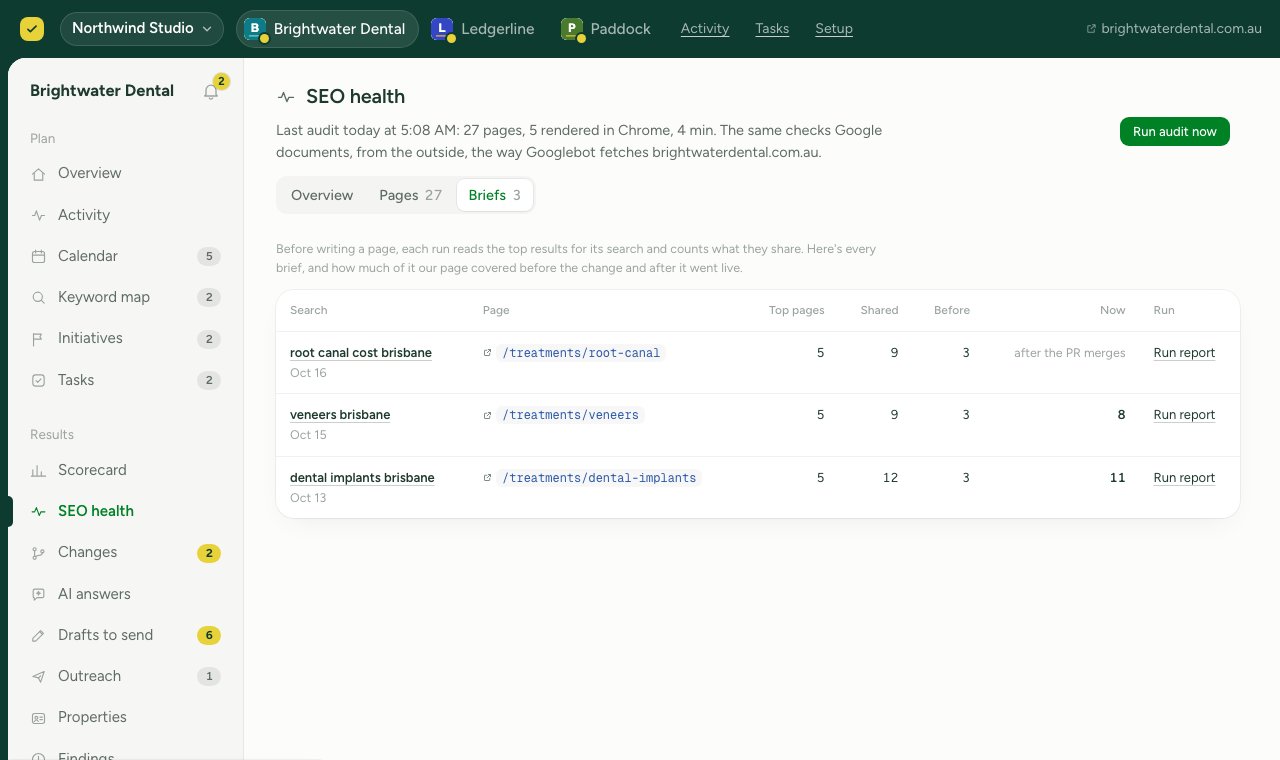
Every brief stays in your dashboard under SEO health, then Briefs: the search, the page, how many things the top pages share, how many your page had before, and how many it has now. Open any one to see the full table.
Does covering it work?
Covering what the top pages share should help, but it's fair to ask whether it does, so Dinkum measures it. At the top of the Briefs tab, every merged change is grouped by whether the live page came to cover more of its brief, and each group shows how its changes did at 14 and 28 days against the rest of your site, with the pages' average Google position before and after.
It's early. No group has five measured changes yet, so for now it says "too few to tell" rather than a rate. It shows what happened alongside a coverage rise, not proof the rise caused it, and we'll publish what it finds either way.
What a brief is not
- It isn't a score Google uses. It's a count of what the pages already ranking have in common. Covering it makes a page complete for the search. It doesn't promise a ranking, and nobody honest can. Whether covering more of it lines up with better results is something we measure across every Dink and publish as we go.
- It isn't a list to stuff in. The search goes in the title, the main heading and the first sentence. After that the page reads naturally: no lists of terms, no hidden text, and nothing mentioned that isn't true.
- It isn't the whole job. Matching the top five only gets a page to their level. What gets it past them is what they don't have, so that's where Dinkum spends the effort.
A content tool, or Dinkum?
A content tool suits you if
You or your writers do the writing, and you want an editor that grades a draft against the top results as you go. Surfer, Clearscope and NeuronWriter all do this well.
Dinkum suits you if
You'd rather the page was researched, written, shipped and checked for you. Dinkum builds the brief, writes the page in your site's code, sends it for your approval, and checks how it does at 14 and 28 days.
Briefs come with every Dink that writes or rewrites a page. There's nothing to switch on. If you want the rest of the picture, here's how Dinkum works, from the morning run to the verdict.
Questions
How is this different from a content score?
A content score grades a draft you're writing. A Dinkum brief goes straight into the writing: the page is written to cover it, and you get the finished page to approve, with the brief beside it and a check of the live page once it's merged.
If my page covers everything in the brief, will it rank first?
Not on that alone. The brief shows what the ranking pages have in common, and covering it makes your page a fair match for them. Ranking above them takes something they don't have, and every change Dinkum makes is judged at 14 and 28 days against the rest of your site, so you see what actually worked.
Where do the top five pages come from?
Google's current results for the search, in your market, fetched the morning the page is written. Dinkum reads the pages themselves, not a database of old copies.
What if the page doesn't exist yet?
Then the brief starts from nothing: every row is a no before the change, and the check a day after it merges shows what the new page covers.
What does the question for me look like?
One short question, in your weekly report, about something the top pages leave out that only you can answer: a real number, an example from your customers, or how you compare with a name AI answers bring up. Answering is optional, and nothing waits on it.
Does Dinkum keep checking after the page ships?
Yes. A day after the change merges it checks the live page against the brief, and from then on it reads the top results for the search every week. When they move on, a refresh goes on your calendar.
Can I see the brief for a page Dinkum changed?
Yes. It's on that change's run report, and every brief is listed under SEO health, then Briefs, in your dashboard.