
SEO forensics: find out why your Google clicks fell, then win the searches that sell
When Google clicks fall, most advice says wait it out or blame the algorithm. There's a better order of work: line the drop up against Google's updates, count your pages by template, check what you changed, then fix the buyer searches you're splitting across your own pages. Here's the method step by step, with what each step turned up when we ran it on a site whose clicks fell 44% in Google's September spam update.

You need Search Console (the Performance report and the Pages indexing report), your sitemap, your site's change history, and analytics that record which page each buyer first landed on. A spreadsheet does the rest.
The worked examples come from Our Event Album (QR code photo albums for weddings and events) and Stickybeak (web analytics). Both are mine and Dinkum works on both, so the figures are straight from their accounts. I've shown their traffic and sales as percentages rather than raw counts.
Step 1: Line the drop up against Google's updates
In Search Console's Performance report, use Compare to put the 14 days after an update finished beside the 14 days before it started, for clicks and for impressions. Google lists every update and its dates on its Search Status Dashboard. Do it for each update inside your drop.
The kind of update tells you where to look next. A core update reassesses quality across the whole web. A spam update goes after specific patterns, so if one lines up with your drop, the question becomes: what on your site looks like the pattern?
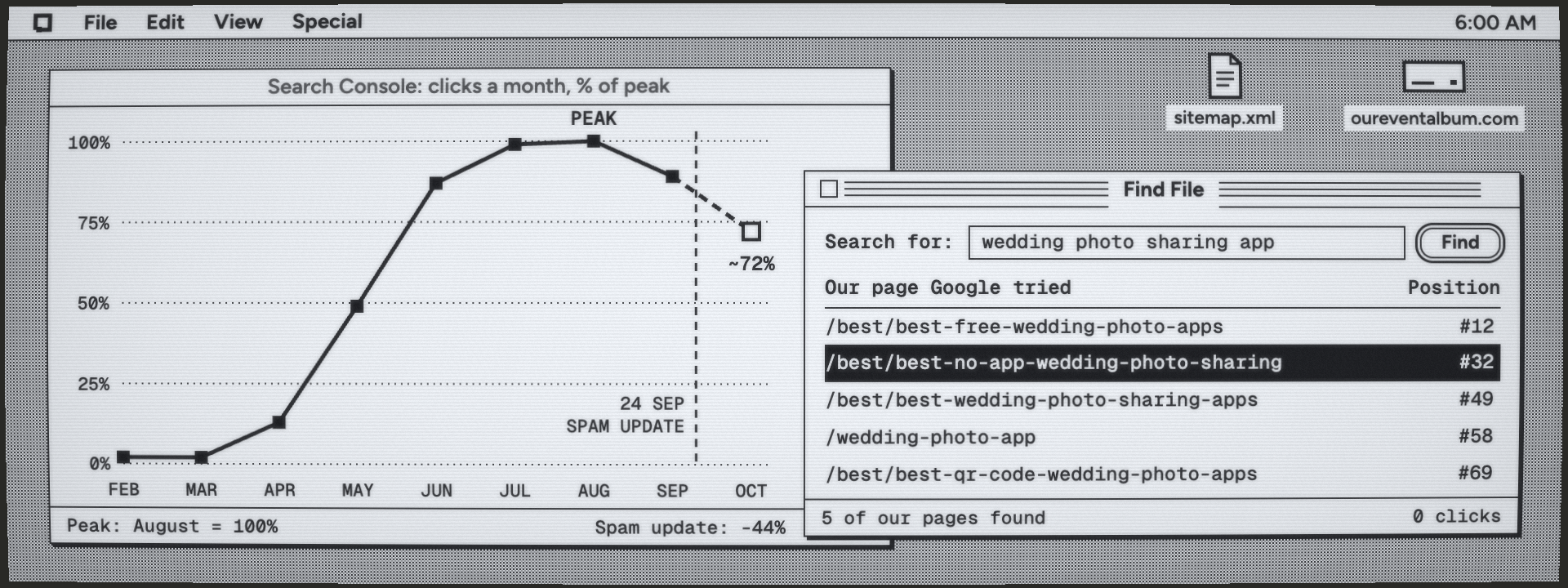
What it showed us: Our Event Album grew fast all year, peaked in July and August, then slid: September came in 11% below the peak and October was on pace for 28% below. Across the spam update (24 September to 8 October), clicks fell 44% and impressions 24%. That pointed at a pattern, not a slow fade.
Step 2: Count your pages by template
Download your sitemap and group the URLs by pattern, replacing each slug with a star: /events/*/*, /vs/*. For each pattern, put its share of your pages beside its share of your clicks over the last 90 days (export the Pages tab of the Performance report). Then open the Pages indexing report and see how much of what Google knows about it has actually indexed.
A pattern with a big share of the pages and almost none of the clicks is what Google calls scaled content abuse: many pages made to rank, each adding little. It's exactly what spam updates are built to find, and it costs you twice. When most of a site is thin, Google spends less on crawling it, so your good pages wait at the back of the queue as "Discovered – currently not indexed".
| Section | Pages | Clicks, 90 days |
|---|---|---|
| /events/<event>/<place>/ | 79% | 2% |
| /vs/<rival>-vs-<rival>/ | 10% | 11% |
| Everything else | 11% | 87% |
What it showed us: 79% of Our Event Album's sitemap was one template, pages like /events/anniversary/hawaii and /events/wedding/guyana: about 1,800 words each of machine-written "local colour" wrapped around the same pitch. Over 90 days, three in four never showed up in search, fewer than one in a hundred earned a click, and together they brought 2% of our clicks. Another 10% of the sitemap compared two of our competitors with each other. Google had indexed 9% of the pages it knew about, and new guides we'd written properly sat unfetched.
The fix: noindex the pattern and take it out of the sitemap, but keep the pages that earn (we kept any with three or more clicks in 90 days). Don't delete. A noindex is reversible, the pages still link through to the guides that matter, and nobody who bookmarked one lands on an error. Our sitemap shrank by 89%.
Step 3: Check what you removed
Before you blame Google, go through your site's change history for the weeks before the drop: commits, CMS revisions, plugin and theme settings. Then compare pages and searches for a month either side in Search Console. A page that lost all its impressions at once was usually changed, not demoted.
What it showed us: a commit on 17 June had marked one of the bigger wedding photo apps as an "inactive competitor", which quietly switched off our review of it. That review had ranked #8 to #10 when people searched the app's own name, and people searching a competitor's name are shopping. By July it was at #40 to #60. We restored it on 6 October, and it's back at #11. A one-line change to which pages exist can cost more than any algorithm.
Step 4: Sort your searches by funnel stage
Split every search in your Search Console data into stages. Top: someone has a problem but no idea a product exists ("celebration of life ideas"). Middle: they know the kind of thing they need and are working out how ("how to collect photos for a funeral slideshow"). Bottom: they're choosing one ("memorial photo sharing"). The words usually tell you: "app", "best", "alternative", "vs" and "price" are bottom. Searches for your own name and for a competitor's name get groups of their own.
Then track the bottom group's position and clicks on their own. Bottom-of-funnel searches are smaller, easier and worth far more, and a blended average hides them.
What it showed us: Our Event Album's buyer searches had sat at #35 to #45 for three months and brought a handful of clicks a week. They weren't hard: nearly all had a difficulty under 20 out of 100, and together they're about 20,000 searches a month. Google just couldn't tell which of our pages was the answer.
Step 5: Find your splits
For each bottom-of-funnel search, filter the Performance report to that search and open the Pages tab for the last 90 days. If two or more of your pages each get a real share of the impressions (we count 15% or more), that's a split. SEO people call it keyword cannibalisation: you've written the same answer several times, so Google keeps testing which one you mean, and none of them gets to be the answer.
| Our page Google tried | Position |
|---|---|
| /best/best-free-wedding-photo-apps | #12 |
| /best/best-no-app-wedding-photo-sharing | #32 |
| /best/best-wedding-photo-sharing-apps | #49 |
| /wedding-photo-app | #58 |
| /best/best-qr-code-wedding-photo-apps | #69 |
What it showed us: for "wedding photo sharing app", Google tried five of our pages, from #12 to #69. For "wedding photo app" it tried three, and for the QR code searches up to five.
Step 6: Read page one and match its format
Search each family yourself and note what kind of page wins, because the fix depends on what Google already rewards. Write the format that wins, not the one you'd like.
- Dated "best" lists win: write a dated, honest list. For "wedding photo sharing app", page one was lists, most of them written by other apps, plus Reddit and Facebook threads.
- How-to guides win: write the complete guide. "QR code for wedding photos" goes to step-by-step guides.
- Product pages win: make a product page. "Guest photo sharing app" goes to home pages.
- Forum threads in the top five: answer the questions they ask, on your page.
Step 7: Make one page per family
Pick the page Google already prefers (the biggest share of impressions, the best position), unless another is clearly the right format. Move anything worth keeping into it and 301 the rest to it. Point every internal link straight at it, the footer included, and take the redirected URLs out of your sitemap.
If the page compares other products, check every fact on each one's own site that day, and say on the page when you checked. A list that's wrong about the people it lists doesn't deserve to rank.
What it showed us: five wedding-list pages became one, and four QR code pages became one guide. Checking the list's table turned up one app's free plan at half its real upload limit, another's 7-day trial listed as a free tier, and a third $10 dearer than it is.
Step 8: Judge by orders, not clicks
In your analytics, rank landing pages by orders (or signups), not visits. Then feed the pages that sell first: make them the winners in step 7, link to them from the pages Google already reads, and write the pages around them.
| Landing page | Share of orders | Visitors who buy |
|---|---|---|
| Memorial photo sharing | 13% | 25% |
| QR code for wedding photos (the guide) | 9% | 14% |
| Home page | 22% | 2% |
| Competitor review pages (all) | 4% | about 1% |
What it showed us: since tracking began on 4 October, 43% of Our Event Album's orders have come from Google. The memorial page's 25% is a handful of buyers, not a law of nature, but the shape is clear. The pages that sell answer someone who has already decided to buy something like ours. The review pages, which bring most of our Google clicks, answer someone who searched a competitor's name. Clicks were the wrong scoreboard.
Step 9: Ask Google to look again
Fixing pages only matters once Google rereads them. Three things work, and one doesn't.
- Resubmit the sitemap. Search Console's API takes a sitemap submission; send the new one the minute it deploys.
- Request indexing, sparingly. URL inspection's "Request indexing" button is capped at roughly 10 pages a day per site. Spend it on pages Google has never fetched, then on each new page as it ships.
- Link to the pages from pages Google already reads. Hubs and popular guides are the fastest way in.
- Not indexing services. Most push URLs through Google's Indexing API, which Google allows only for job posts and livestreams, or through link spam. Right after a spam update is the worst possible time.
Step 10: Wait, then measure against the rest of the site
Give a changed page four weeks, and a recovery from an update longer: it takes as long as Google takes to recrawl the site and reassess it. Compare the pages you changed with the pages you didn't over the same weeks, so a seasonal swing doesn't fool you. We'll report back on Our Event Album in November with the same charts, good or bad.
On a new site, run a census instead
A brand-new site has no drop to explain and no orders to judge by. Use steps 4 and 6 the other way round: find who owns the buyer searches before you write anything. List the searches a buyer in your category would type, read page one for each, and estimate each site's share of the clicks from its positions and the search volumes.
What it showed us: for Stickybeak, Dinkum researched 21 starting searches, kept the 68 a buyer would type and read page one for 42 of them. Nobody owns them. The biggest site takes under 9% of the clicks, and the best-known name in privacy analytics takes 5%. More than half go to "best X" and "X alternatives" lists, and several of the leaders are rival products writing the list they appear in. Reddit turns up on page one again and again, and three times in four it's in the top three.
For a new site that's the best news you can get: no entrenched giant, a format that clearly wins, and a soft spot (forum threads) anyone can answer well. Stickybeak's calendar now opens with six buyer pages, starting with an honest alternatives list built on a dated comparison table.
What this method can't tell you
It can't prove cause. On Our Event Album the timing, the size and the pattern all pointed at the template pages, and pruning them was right regardless, but a correlation across one update is still a correlation. Search volumes and difficulty scores are estimates from DataForSEO, click shares in a census are estimates from positions, and a month of orders is a small sample. Treat all of them as directions, not decimals.
How Dinkum runs it
Dinkum now runs this method first on every site that sells something. Every plan sees the buyer searches split across your pages, the pages that actually sell and any templated section that earns nothing, and it plans the bottom-of-funnel page for each family before any new top-of-funnel article. Each change is still a Dink: one pull request on your own site, judged at 14 and 28 days against the rest of it.
If you'd rather run the method yourself, everything above is the whole thing. If you'd rather it happened five mornings a week while you get on with your business, that's what Dinkum is for.